Smile, You’re Being Hacked:  Nozomi Networks Labs Finds Five New Flaws in Hanwha Wisenet Cameras

Smile, You’re Being Hacked: Nozomi Networks Labs Finds Five New Flaws in Hanwha Wisenet Cameras

Introduction

Network cameras are standard in offices, schools, shops, and public spaces. Beyond recording video, they add software features like object detection, alerts, and fleet management—useful for both safety and daily operations. Hanwha Vision is a major vendor in this space: the QNV-C8012 is a compact 5-megapixel dome camera promoted for office, retail, and education deployments, while Wisenet Device Manager (WDM) is the Windows utility for discovering, configuring, and maintaining large groups of cameras and recorders.

Nozomi Networks Labs analyzed a QNV-C8012 running firmware v2.22.00_20240909_R188 and WDM v2.9.2.0. The research identified five vulnerabilities that, when combined, could let an attacker read sensitive data, change device and fleet settings, and move deeper into the network from these systems.

Following the findings, the team engaged Hanwha Vision’s security response program (S-CERT) under responsible disclosure. This article explains the affected components, the practical risks at a high level, and concrete steps to reduce exposure.

リサーチ範囲

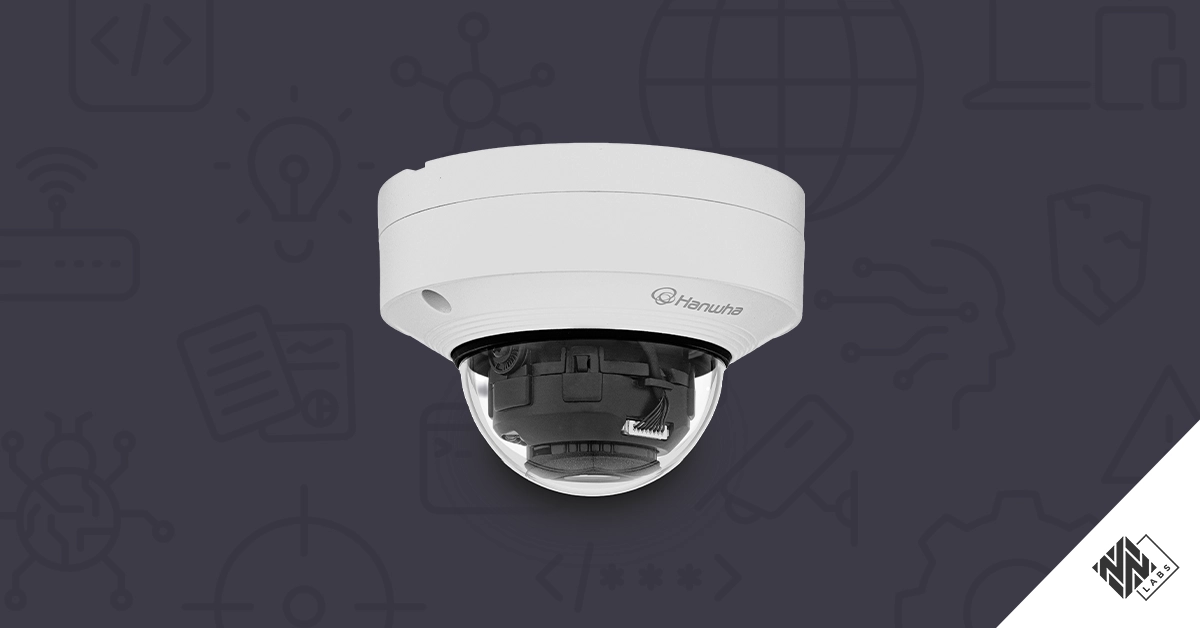
The QNV-C8012 from Hanwha Vision is a versatile network surveillance camera engineered for reliable monitoring in both indoor and semi-outdoor environments. Featuring an 8MP sensor, it delivers high-resolution video ideal for detailed observation and forensic review. Its compact dome design enables unobtrusive installation in various settings, including retail, office, and industrial spaces. Advanced features such as WiseStream II compression and motion detection optimize both bandwidth usage and event-based recording.

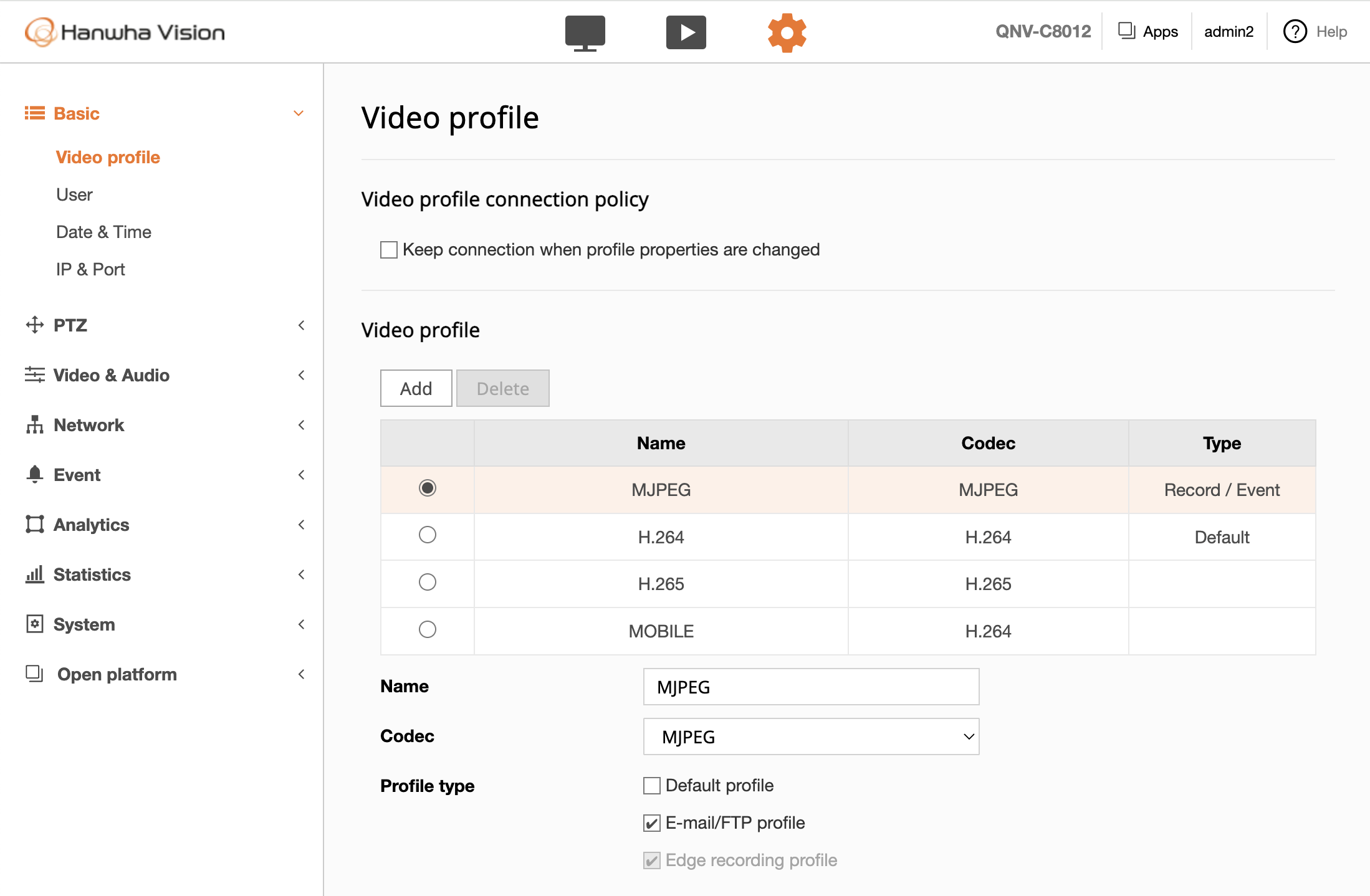
The QNV-C8012 supports remote access and configuration via its integrated web interface, allowing users to stream live video, review recorded events, and adjust settings to suit specific monitoring needs. A sample screenshot of the web application interface follows:

Figure 1. Hanwha Vision management web application

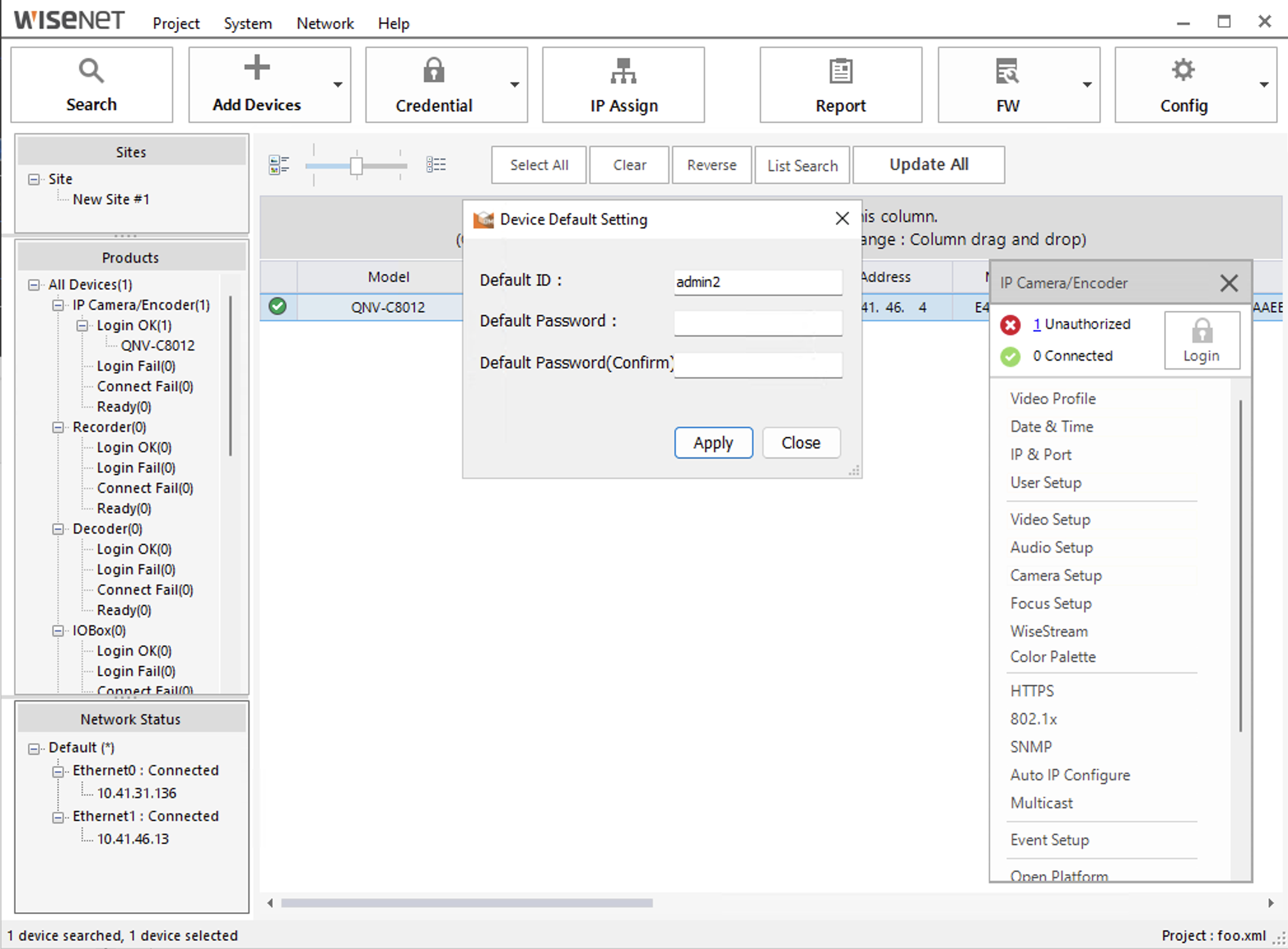
Additionally, we analyzed the Wisenet Device Manager (WDM) Windows application. The WDM tool is a powerful and intuitive software application designed to help users efficiently manage Hanwha Vision security devices, including IP cameras, NVRs, and DVRs. This centralized tool allows administrators to discover, configure, and monitor multiple devices across a network, ensuring seamless operation and security. A sample screenshot of the interface follows:

Figure 2. Wisenet Device Manager (WDM) Windows application

Attack Scenario

In the previous section, we looked at how the QNV-C8012 camera and the Wisenet Device Manager (WDM) are meant to be used: the camera quietly watching entrances and corridors, and WDM acting as the central “control room” where an operator discovers, configures, and monitors many Hanwha devices from a single Windows workstation.

Now imagine this setup in a real environment, such as a busy office building or retail store. An operator sits at their desk, using the camera’s web interface to review footage and statistics from the “People Counting” web page (i.e., a feature that allows to count the number of persons that cross a pre-defined line), while WDM keeps an entire fleet of cameras and recorders organized in the background.

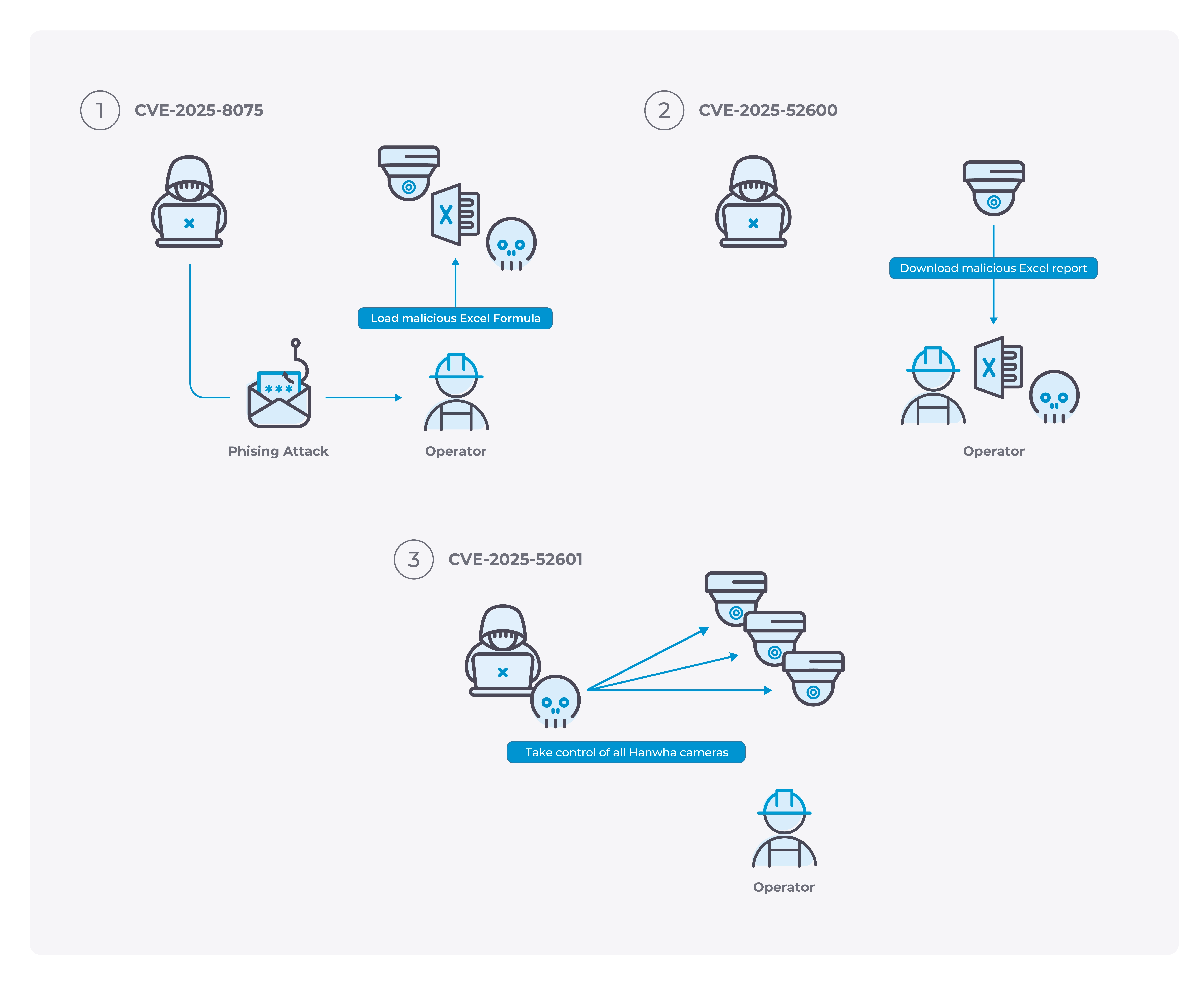
The vulnerabilities we identified show how an attacker who can reach that same network could twist this normal workflow into a two-step attack: first compromising the operator’s PC, then using it as a springboard to take over multiple cameras.

Figure 3. Overview of the attack scenario

Step 1 – A “poisoned” report on the operator’s PC

Picture the operator logging into the QNV-C8012 web interface to check the “People counting” feature and download an occupancy report. The page looks completely normal.

Behind the scenes, however, an attacker abuses a web flaw (CVE-2025-8075) to sneak hidden instructions into the people-counting rules, giving harmless-looking entries secretly dangerous names (i.e., a malicious Excel formula that executes an arbitrary command on the local PC when the file is opened). It’s important to note that this issue arises only if the “CloudConnector” add-on has been previously installed on the camera.

Later, if the user has manually enabled the “FTP Event Send” function, the system does what it always does: it generates an automatic Excel report for the operator. Because of another weakness (CVE-2025-52600), the software blindly trusts those rule names and copies them directly into the spreadsheet. The result is a booby-trapped report. When the operator opens it, the embedded content can make the workstation run unwanted commands instead of just displaying numbers and charts.

At this point, the attacker has turned a simple usage report into a remote foothold on the operator’s PC.

Step 2 – From one PC to many cameras

With code now running on that workstation, the attacker’s next goal is scale. Rather than going after each camera individually, they target Wisenet Device Manager—the centralized tool that manages many cameras, NVRs, and DVRs across the network.

Due to a hard-coded password issue (CVE-2025-52601), WDM stores a shared default username and password in a way that can be decrypted. From the compromised workstation, the attacker can extract those credentials and then try them against every device that still uses the default settings.

In the worst case, what begins as a single malicious report can end with an attacker quietly driving an entire fleet of cameras—changing where they point during critical moments, tampering with recordings, or altering physical security mechanisms that protect restricted or critical areas of the building. From the operator’s point of view, everything still looks routine: they simply opened a report, unaware that their surveillance system is now working for someone else.

これらの脆弱性の影響

The weaknesses we identified in the Hanwha Vision QNV-C8012 and Wisenet Device Manager can translate into practical risks for day-to-day operations, such as:

  • Theft of Operational Information (T0882). Because the camera does not reliably verify server certificates, an attacker positioned between the device and its destination can intercept or alter “secure” HTTPS/SMTP traffic. In practice, this could reveal sensitive content or credentials and enable silent tampering of data.
  • Manipulation of Control (T0831). A cross-site scripting flaw in the web interface can run attacker-supplied code in an operator’s browser. This opens the door to stealing session data, changing configuration through the user’s session, or planting further payloads without extra prompts.
  • Loss of Productivity and Revenue (T0828). Weak client-side enforcement around report generation allows untrusted content to be injected into Excel exports. When opened, malicious spreadsheet formulas or embedded logic can drive follow-on attacks against the operator’s computer; while modern Office blocks internet-origin macros by default, risky behaviors remain possible in certain contexts (e.g., trusted locations, internal shares, or user overrides).

脆弱性リストと影響を受けるバージョン

Nozomi Networks identified five medium severity issues in the Hanwha Vision QNV-C8012 running firmware v2.22.00_20240909_R188 and Wisenet Device Manager (WDM) v2.9.2.0. The table below list the vulnerabilities confirmed and published by Hanwha Vision:

CVE IDCWECVSS v4.0 Base ScoreCVSS v4.0 Vector
CCVE-2025-52598CWE-295: Improper Certificate Validation6.3CVSS:4.0/AV:N/AC:H/AT:P/PR:N/UI:N/VC:N/VI:N/VA:L/SC:N/SI:N/SA:N
CVE-2025-52599CWE-732: Incorrect Permission Assignment for Critical Resource6.3CVSS:4.0/AV:N/AC:L/AT:P/PR:N/UI:N/VC:N/VI:N/VA:L/SC:N/SI:N/SA:N
CVE-2025-52600CWE-602: Client-Side Enforcement of Server-Side Security5.2CVSS:4.0/AV:N/AC:L/AT:P/PR:H/UI:P/VC:N/VI:N/VA:N/SC:H/SI:H/SA:H
CVE-2025-52601CWE-259: Use of Hard-coded Password6.3CVSS:4.0/AV:L/AC:L/AT:N/PR:L/UI:N/VC:N/VI:N/VA:N/SC:H/SI:H/SA:H
CVE-2025-8075CWE-79: Improper Neutralization of Input During Web Page Generation ('Cross-site Scripting')5.8CVSS:4.0/AV:N/AC:L/AT:P/PR:L/UI:N/VC:N/VI:N/VA:N/SC:H/SI:H/SA:H

Vulnerability Spotlight

This section provides a detailed analysis of the vulnerability chain, explaining how individual flaws can be combined to escalate an attack from a browser compromise to workstation code execution, and ultimately steal credentials impacting multiple cameras.

Step 1: From XSS to Workstation Code Execution

While analyzing the Hanwha QNV-C8012 camera, we identified that it allows to expend its functionality by installing additional application through the Wisenet Open Platform website. At the time of our research, the only available application for our camera was the Hanwha Vision CloudConnector app. After installing it, we identified that users could interact with the Wisenet Open Platform through POST requests to the /cgi-bin/stw.cgi endpoint. An example of normal request follows:

POST /cgi-bin/stw.cgi HTTP/1.1

[…]

%3CGetSDK_APP_DATA%3E%3CAppName%3ECloudConnector%3C/AppName%3E%3CData%3E

%3CRequest%3E%3CCommand%3EGetDeviceStatus%3C/Command%3E%3CTid%3EhXqS6Wk5n7#

1742983227911%3C/Tid%3E%3C/Request%3E%3C/Data%3E%3C/GetSDK_APP_DATA%3E

HTTP POST request

HTTP/1.1 200 OK

[…]

<?xml version="1.0" encoding="utf-8" ?>

<Response_GetSDK_APP_DATA>

<Data><Response> <Tid>hXqS6Wk5n7#1742983227911</Tid> <Devi

ceStatus> <Claimed>false</Claimed> <MqttConnection>false</M

qttConnection> <EdgeAppVersion>1.5.9</EdgeAppVersion> </DeviceSt

atus></Response></Data>

</Response_GetSDK_APP_DATA>

HTTP Response

The web application reflects the value of the Tid entity directly in its response. Closer inspection revealed that this input is insufficiently validated. In fact, it was possible to inject a CDATA section into the Tid entity containing an XHTML body element with embedded JavaScript. Because the application inserts this content as-is into the response, it results in an XSS vulnerability (assigned CVE-2025-8075).

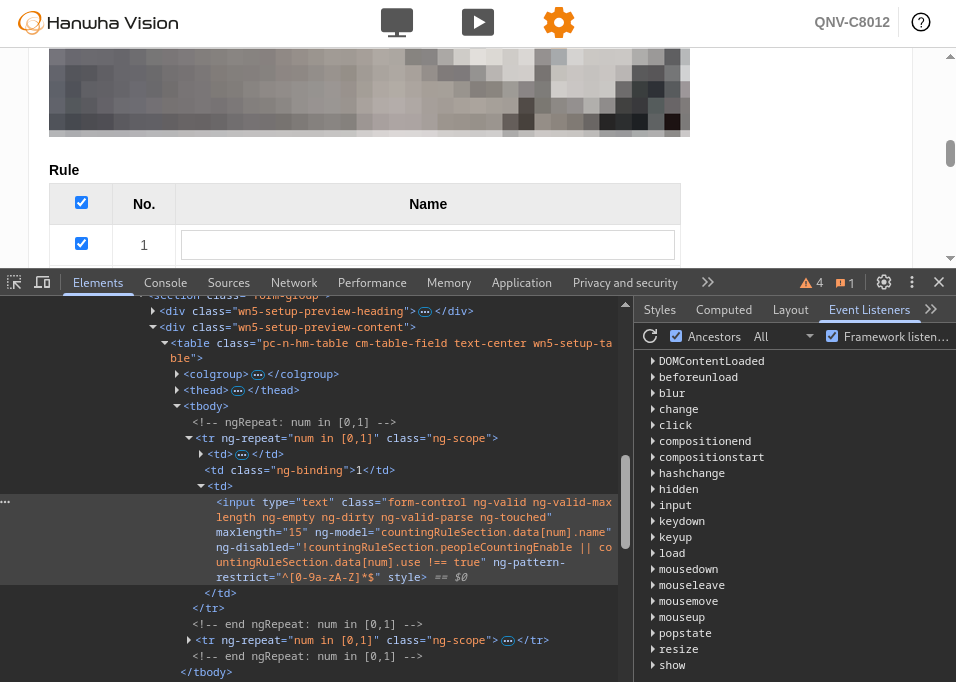
Further analysis showed another issue: the Statistics > People counting feature allows users to define custom rule names. By inspecting the source code of web page, we discovered that the client side applies a regex to restrict these names to alphanumeric characters, as illustrated below:

Figure 4.Client-side code restricts characters

Our analysis showed that this rule is not enforced server-side, which makes it possible to inject characters outside the expected alphanumeric set. Because the application fully trusts this input when generating automated XLSX reports, an attacker can abuse it to embed arbitrary content.

Among the possibilities is formula injection: if Dynamic Data Exchange (DDE) functions are included in the file and the victim opens it with Excel configured to auto-process DDE, the attacker can trigger a range of attacks, potentially achieving remote command execution on the victim’s system.

The following Proof of Concept (PoC) illustrates how CVE-2025-52600 can be exploited in practice. For this demonstration, the HTTP interaction was carried out directly with the camera, bypassing the client application altogether.

GET /stw-

cgi/eventsources.cgi?msubmenu=peoplecount&action=set&Enable=True&Line.1.Name=%3d%63%6d%64%7c%27%20%2f%43%20%63%61%6c%63%27%21%27%41%31%27&Line.1.Coordinate=1267,895,1057,1511&Line.1.Mode=RightToLeftIn&Line.1.Enable=True&Line.2.Name=%3d%63%6d%64%7c%27%20%2f%43%20%63%61%6c%63%27%21%27%41%32%27&Line.2.Coordinate=336,1211,542,742&Line.2.Mode=RightToLeftIn&Line.2.Enable=True&ObjectSizeCoordinate=1412,855,1179,1088&CalibrationMode=ObjectSize&SunapiSeqId=1501 HTTP/1.1

[…]

HTTPリクエスト

As a result of this request, the two rules are renamed with DDE functions which, when the generated file is opened in Excel with DDE enabled, automatically trigger the execution of the calc program.

Figure 5.Malicious rule names has been inserted bypassing the regex rule

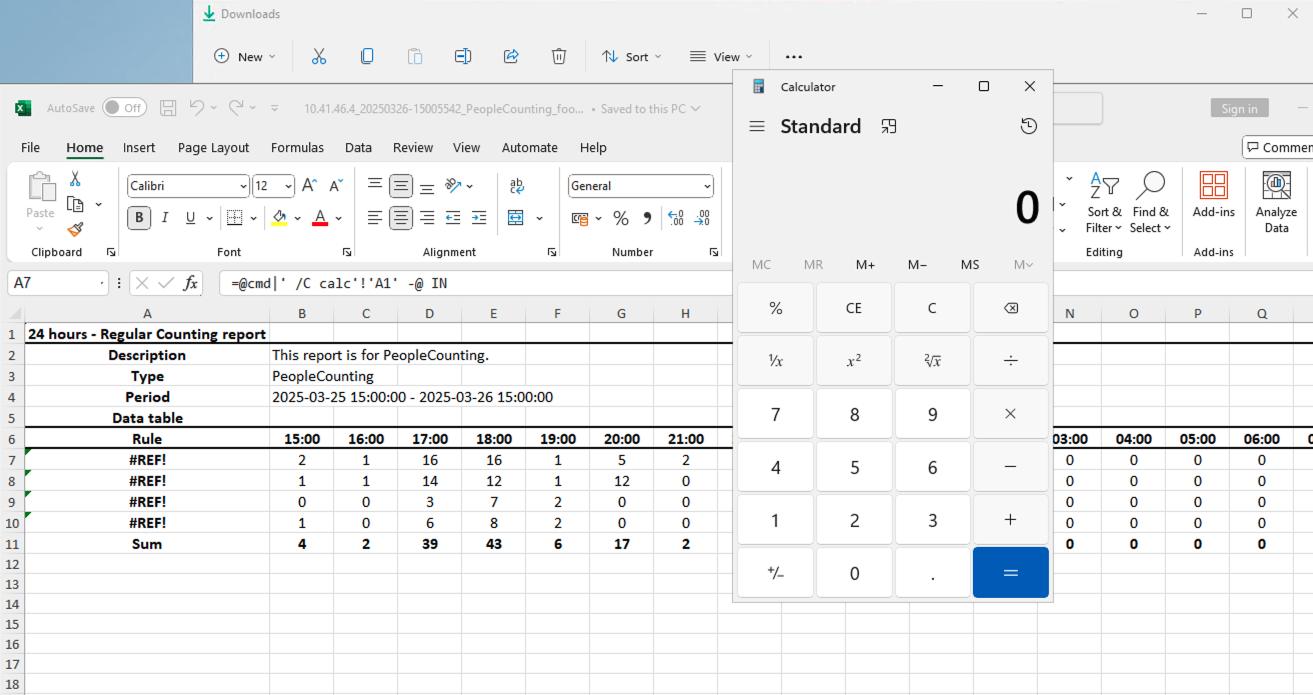
Finally, this is the outcome after opening the XLSX file in Excel. As may be noticed, the “calc” application opened, confirming the execution of arbitrary code in the victim’s workstation.

Figure 6.Windows application is executed after opening the Excel file

The HTTP request used to inject malicious rules for CVE-2025-52600 can also be reached through the earlier CVE-2025-8075 Cross-site Scripting flaw. In practice, this means an attacker could chain the two issues together. Still, one obstacle remains: the attacker must convince the victim to actually download and open the crafted Excel file—an extra step that shifts the attack from pure exploitation into the realm of social engineering.

Step 2: Stealing camera default credentials

Once the attacker achieves code execution on the victim’s workstation, they can remotely interact with the Windows machine that downloaded and opened the malicious Excel file. If this happens to be the system running Wisenet Device Manager, a new opportunity arises, exploiting CVE-2025-52601 to decrypt the default username and password and attempt to take control of every camera configured with those shared credentials.

To understand this weakness, let’s look at how Wisenet Device Manager handles sensitive data. Most project information and settings are securely stored in project files, encrypted using a password chosen by the user. However, one exception stands out: the Device Default Credential Setting. This feature allows users to define a pair of default credentials used when connecting to a camera for the first time. Crucially, these credentials are not tied to a specific project but are shared across all projects—making them a high-value target once exposed.

Figure 7.Device Default Settings

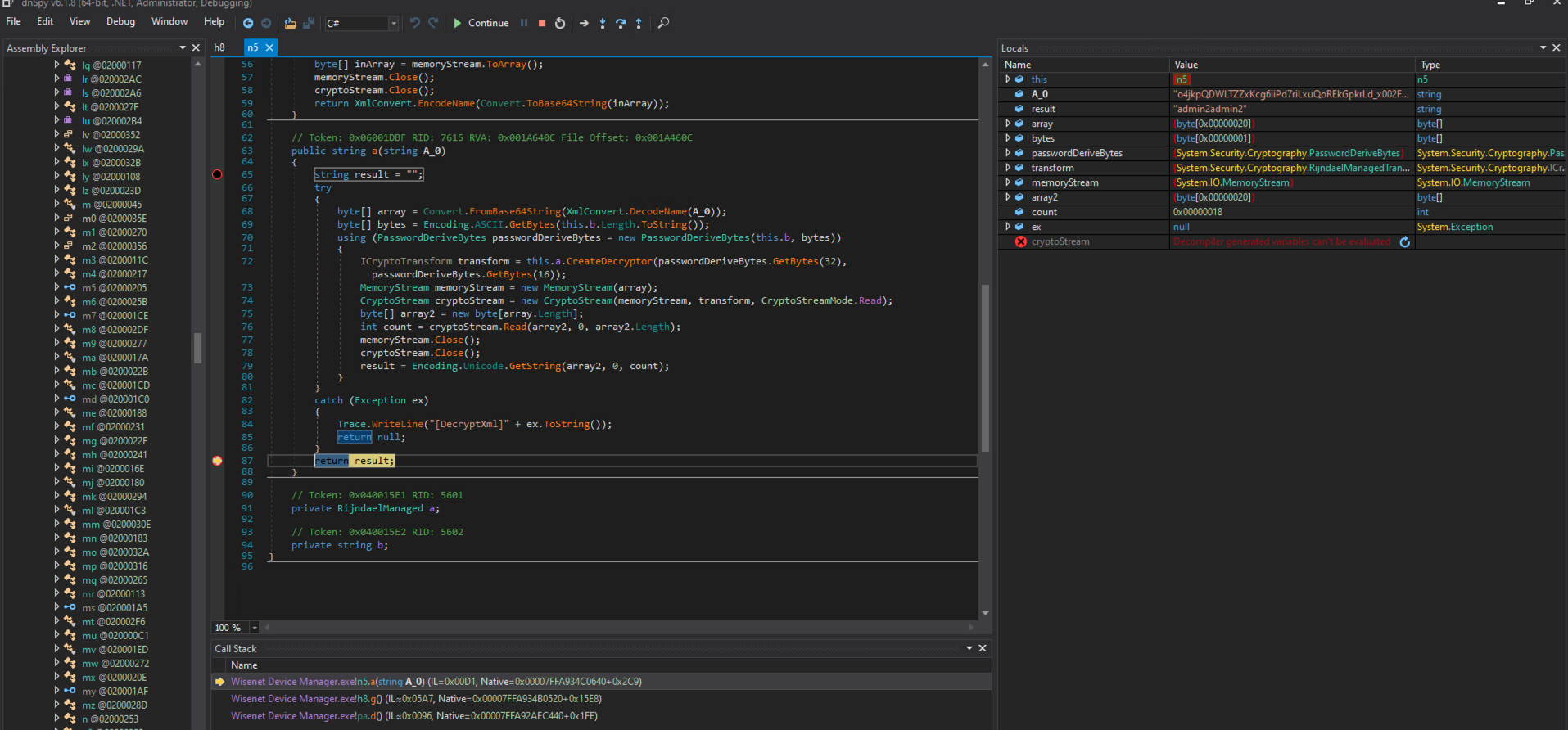
To verify how these credentials are stored on the Windows system, we carried out a reverse-engineering effort. For testing, we configured a pair of default credentials (admin2 / admin2admin2) within the application. Next, we launched a debug session with dnSpy, a well-known .NET reversing utility, to observe how Wisenet Device Manager decrypts this data at startup.

During initialization, the application instantiates a new object of class h8 (the analyzed binary had stripped symbols). This class appears to hold a collection of default application settings. Of particular note, the attribute f within this object is initialized with the constant value **** (redacted).

Figure 8. Default settings of the Windows application

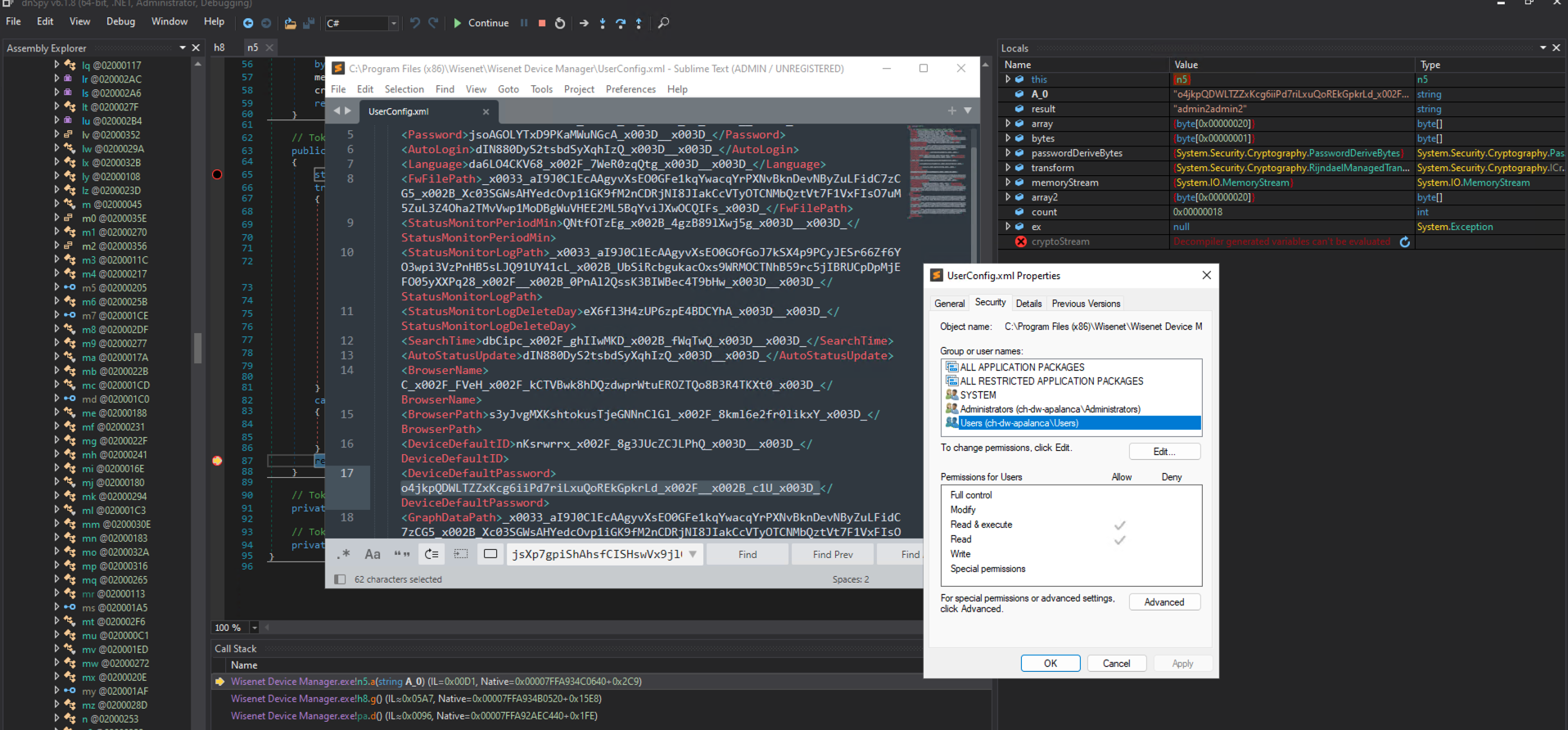
After executing some instructions, the application tries to load the encrypted “DeviceDefaultPassword” setting from the file “C:\Program Files (x86)\Wisenet\Wisenet Device Manager\UserConfig.xml” by invoking the method “n.a” and passing as argument the encrypted value. The method “n.a” performs the AES decryption of the encrypted value. In the evidence below, note how attribute “n.b” is still “****”.

Figure 9. The default key is used to decrypt the password

After its execution, as can be seen below, the method “n.a” returned the default password “admin2admin2” stored for testing purposes, confirming that indeed the value is encrypted with the hardcoded password “****”.

Figure 10. Default password has been correctly decrypted

Additionally, the analysis uncovered that the file “C:\Program Files (x86)\Wisenet\Wisenet Device Manager\UserConfig.xml” is readable by all Windows users.

Figure 11. The UserConfig.xml file is readable by all Windows users.

As such, any Windows user – even with low privileges – may read the content of this file, decrypt the default username and password, and attempt to obtain control of all cameras that share this set of credentials.

Conclusions and Recommendations

Our analysis of Hanwha Vision’s QNV-C8012 and Wisenet Device Manager (WDM) uncovered weaknesses that, in combination, can pose concrete and high severity consequences on the security posture of a network that uses these products. We coordinated our findings with Hanwha Vision’s S-CERT under responsible disclosure so that the following patches has been developed to solve these issues:

  • Hanwha Vision QNV-C8012 v2.22.10_20251203_R290  
  • Wisenet Device Manager (WDM) v2.9.3.1
  • Hanwha Vision CloudConnector_v_Q_AI_2_11_04_20251016_hva_prod

Consistent with Nozomi Networks Labs’ mission, our goal is to provide operators and vendors with practical steps that improve the reliability and security of connected systems. We will continue to collaborate responsibly with Hanwha Vision and share guidance that helps make video-surveillance environments safer and more resilient.

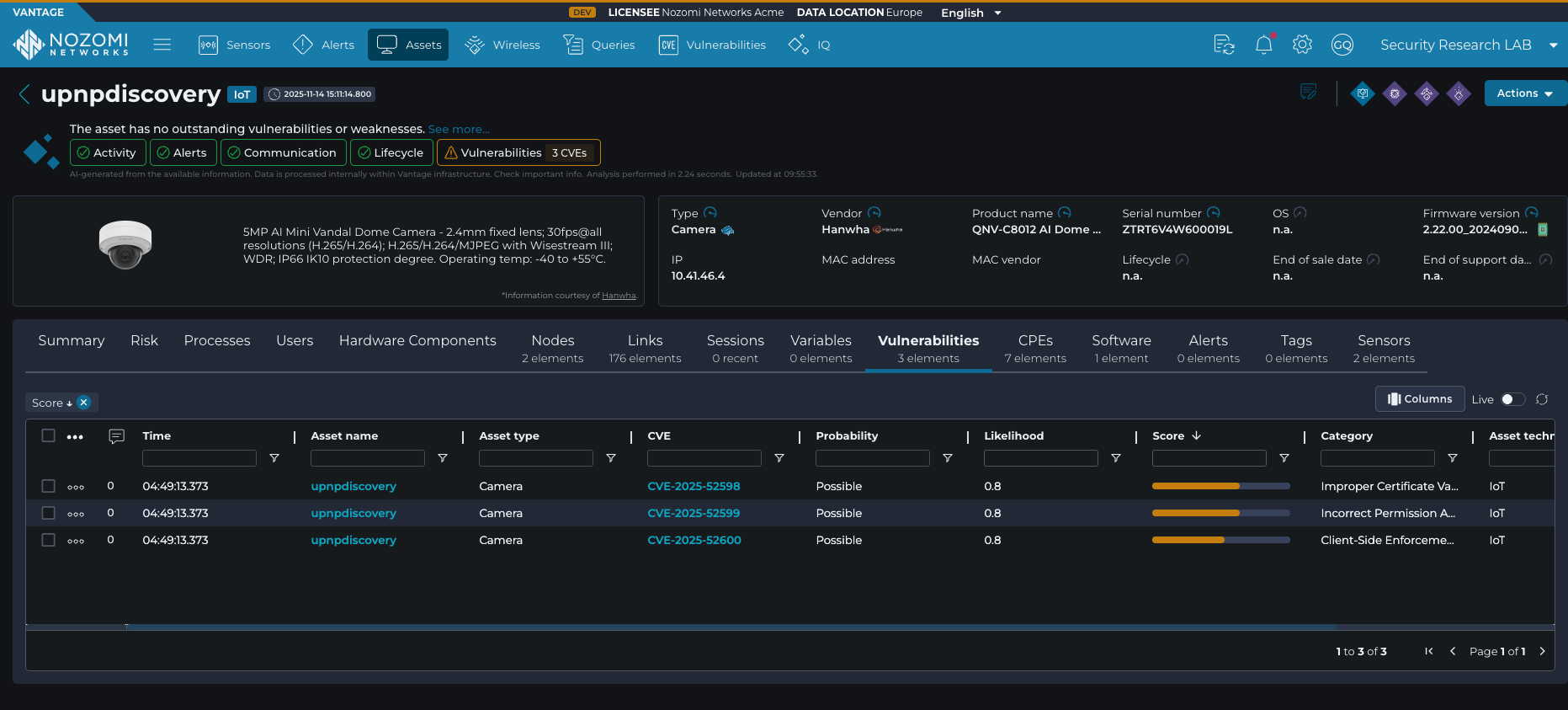
To help organizations promptly identify whether the vulnerable device is present in their environment—and to detect and alert on exploitation attempts before they lead to operational disruption, compromise, or further attack progression – asset owners can rely on the advanced capabilities of Nozomi Networks OT/IoT Security Platform. The platform provides deep visibility into network traffic and device behavior, enabling effective vulnerability and threat detection across OT and IoT networks.

Figure 12. Detection of vulnerable device

This proactive monitoring empowers security teams to respond to vulnerabilities and attacks swiftly and effectively, minimizing the impact of attacks targeting critical networks. To learn more about Nozomi Networks OT/IoT Security Platform and see it in action, request a demo today.

見つかりませんでした.
見つかりませんでした.
見つかりませんでした.
見つかりませんでした.